
The Migration Challenge
Why “Lift and Shift” Fails in Kubernetes
Kubernetes workloads comprise more than just container images—they encapsulate state, storage dependencies, service endpoints, and intricate metadata. A naive “lift and shift” approach that moves persistent data, manifest files, and images overlooks the crucial platform-specific configurations required for true application fidelity.
Key Technical Barriers:
Storage Class Incompatibility: Storage classes in Tanzu (e.g.,
vsphere-sc) differ from those in OpenShift (ocs-storagecluster-ceph-rbdor ODF). Direct migration results in failed volume attachments and inaccessible persistent data.Load Balancer Config Differences: Platforms often use different load balancer controllers—Tanzu might rely on NSX-T integration, while OpenShift uses MetalLB or integrated OCP load balancing. Service exposure can break if config isn’t mapped.
Networking Policy Variation: Tanzu’s Antrea CNI vs. OpenShift’s OVN-Kubernetes leads to diverging network policy formulations and enforcement criteria.
Resource Quotas and Limits: CPU and memory assignments, quota objects, and limit ranges must be tailored to match the destination cluster’s available resources and governance.
Platform-Specific Metadata: Each distribution embeds custom annotations, labels, and even CRDs (Custom Resource Definitions) into workload manifests for orchestration, management, or security.
Desire to modify the size of a VM, for multiple reasons. You can increase or decrease vCPUs, RAM, change the chipset, whatever.
Real-world Scenario
Imagine an enterprise running a tiered web app in Tanzu—backed by vSphere, with policies, quotas, and storage rooted in VMware tooling. They plan to migrate to OpenShift on bare metal (or cloud) for cost efficiency and Red Hat support. A direct move yields:
Persistent volumes unmounted, storage errors logged
Networking policies misapplied, inter-pod traffic blocked
Load-balancer service endpoints inaccessible
Resource limits exceeded, pods stuck in Pending state
Automatic redeploys fail due to missing labels or security contexts
The result: days of troubleshooting, impromptu refactoring, or a rollback that delays business strategy.
Trilio Transform Feature Deep Dive
How Metadata Transformation Works
Trilio’s transform capability is embedded in the restore workflow—where metadata mappings and contextual rules are executed to adapt resources for the destination platform. Unlike one-size-fits-all backup tools, Trilio pairs application-consistent backups (data + metadata) with a customizable transform engine. This process involves:
Parsing all resource definitions (Deployment, StatefulSet, PVC, Service, Ingress, NetworkPolicy, etc.) in the backup
Applying rule-based or operator-defined mappings to storage, networking, and resource specs
Overwriting or appending platform-specific annotations, labels, and selectors as required
Generating transformed manifests for restore in the target cluster
Key Transform Features
Storage Class Transformation
Automatically convert storage class assignments during migrations. Example:
Before (Tanzu):
					apiVersion: v1
kind: PersistentVolumeClaim
metadata:
  name: app-data
spec:
  storageClassName: vsphere-sc
  resources:
    requests:
      storage: 10Gi
After (OpenShift):
					apiVersion: v1
kind: PersistentVolumeClaim
metadata:
  name: app-data
spec:
  storageClassName: ocs-storagecluster-ceph-rbd
  resources:
    requests:
      storage: 10Gi
Trilio automatically replaces the storageClassName when the corresponding rule is applied.
Resource Mapping
Adjust specifications for CPU, memory, and other resource limits/requests to comply with the target platform’s quotas:
					# Before (Tanzu)
resources:
  requests:
    cpu: "500m"
    memory: "512Mi"
  limits:
    cpu: "1"
    memory: "1Gi"
# After (OpenShift)
resources:
  requests:
    cpu: "1000m"
    memory: "1024Mi"
  limits:
    cpu: "2"
    memory: "2Gi"
Transformation rules allow fine-tuning and automatic scaling during migration.
Network Policy Adaptation
Transform network configuration objects for different CNI plugins:
					# Before (Tanzu Antrea)
policyTypes:
- Ingress
- Egress
# After (OpenShift OVN)
policyTypes:
- Ingress
- Egress
ingress:
- from:
    - podSelector:
        matchLabels:
          role: frontend
Trilio ensures compatibility by adapting the structure and allowed attributes per CNI.
Load Balancer Strategy Changes
Switch from NSX-T-specific load balancer configs to OpenShift integrated services automatically:
					# Before
type: LoadBalancer
annotations:
  service.beta.kubernetes.io/vsphere-load-balancer: "enabled"
# After
type: LoadBalancer
annotations:
  service.beta.openshift.io/serving-cert-secret-name: "app-cert"
Platform-Specific Metadata Handling
Migrate custom annotations, labels, and resources by substituting, adding, or removing keys according to the destination environment.
The best part about this, is that you can use many different ways to apply these changes. One is using Trilio UI, as you can see in the next screenshot, or you can automate large volume of migrations with for example tools like Ansible. At the end of the day Trilio is a cloud native tool!
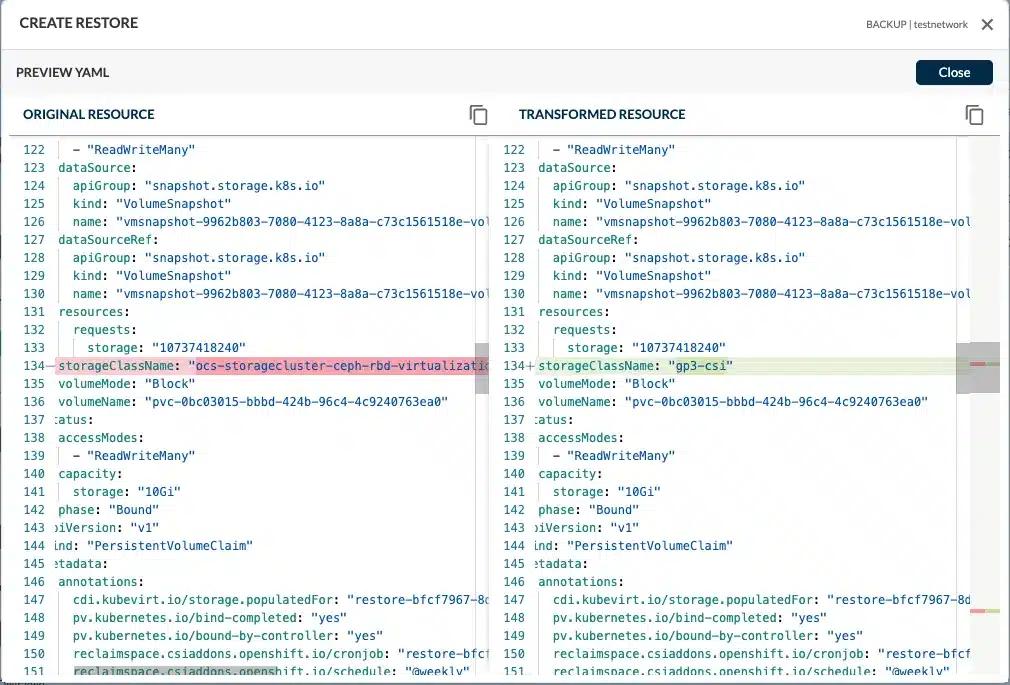
On the previous screenshot you can see how easy is to change a StorageClass
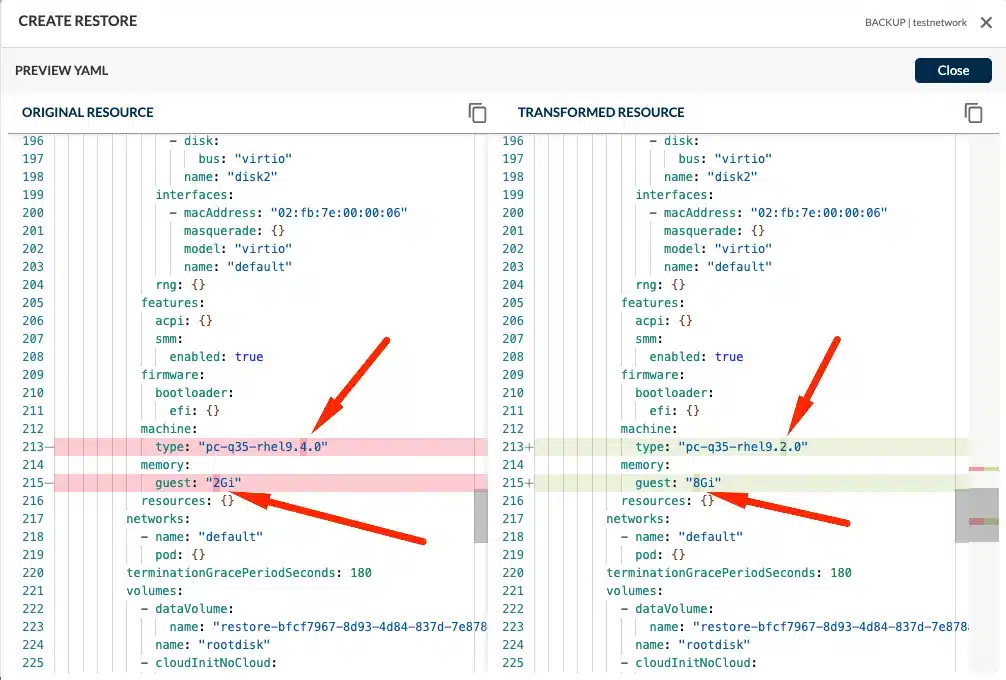
On the previous one, I wanted to show that we can do multiple at the same time, and in different components of the application if you wish. Here we are increasing the amount of RAM when restoring this VM, and also changing the chipset, as it happens that I am restoring to an older version of OpenShift that didn’t support rhel9.4
Restore Process
When restoring, Trilio applies these transformations on-the-fly, creating resource manifests tailored for the target. The restored workloads not only functionally match their original state but also “fit” into the new Kubernetes distribution with appropriate plumbing, compliance, and security contexts. Admins can customize or review the transforms before execution, ensuring granular control.
Step-by-Step Migration Workflow
1. Assessment Phase
Discover all workloads targeted for migration using Trilio’s workload discovery UI or CLI tools. Trilio scans clusters for resource relationships, dependencies, and metadata, ensuring no orphaned or overlooked components.
2. Backup Creation
Initiate application-consistent backups—including all relevant namespaces, persistent volumes, resource specs, and metadata—in universally compatible formats:
Data: QCOW2 files support broad platform compatibility
Metadata: JSON resource definitions for flexible manipulation
3. Transform Configuration
Configure transformation logic via Trilio’s intuitive UI. Rules can be set for:
Storage class mappings (e.g., from
vsphere-sctoocs-storagecluster-ceph-rbd)Resource scaling (adjust CPU/memory for new cluster sizes)
Network policy conversion (translate Antrea policies to OVN/Kubernetes)
Metadata and label reconfiguration
Visual rule-building (drag-and-drop, dropdown selectors) simplifies complex mappings for platform architects.
4. Target Preparation
Ensure the destination cluster is ready:
Pre-register necessary storage classes, network policies, and quotas
Validate platform-specific CRDs and RBAC policies
Confirm user permissions for Trilio restore workflows
5. Execution
Trigger migration from the Trilio UI or automate via CI/CD pipelines (Jenkins, Gitlab, Argo, or Bash/Ansible automation). During restore, selected transforms are executed in real time, adapting resource definitions on the fly.
6. Validation
Post-migration, Trilio offers reporting and monitoring tools to verify:
All workloads are running and accessible
Persistent data is intact and available
Network traffic flows as desired
Platform-specific indicators (labels/annotations) are correctly applied
Admins can use dry-run features for safe, previewed transformation before committing changes.
Integration with CI/CD and Automation
API and CLI support enable migration integration into existing DevOps toolchains. For example, Ansible playbooks can automate entire transform-restore workflows for periodic syncs and disaster recovery.
Advanced Use Cases and Benefits
Multi-Cloud Strategy
Trilio transforms unlock true portability—workloads can shift from private datacenters (VMware Tanzu) to cloud-based managed services (EKS, AKS, GKE), including hybrid deployments spanning multiple clusters. Policies and resource definitions are reconciled in transit, not manually refactored.
Disaster Recovery
Transform rules adapt backup workloads to new infrastructure deployed in a crisis. For example, applications restored to a cloud region may require different storage classes and network setups—Trilio automates this for minimal downtime.
Dev/Test Environment Creation
Spin up QA, staging, or development environments on alternate platforms using transformed manifests. Resources can be scaled down and policies relaxed without affecting production.
Cost Optimization
Organizations seeking lower TCO can migrate workloads to more cost-efficient platforms (from proprietary Tanzu on vSphere to vanilla or OpenShift on bare metal/public cloud) without sacrificing application integrity or data fidelity.
Compliance and Security
Transforms allow adaptation of security contexts, RBAC policies, and annotations—ensuring migration aligns with regulatory requirements and platform governance.
No Vendor Lock-In
Trilio leverages non-proprietary backup formats; workloads and metadata are portable, auditable, and recoverable on any Kubernetes distribution using QCOW2 for persistent data and JSON for metadata—no proprietary tie-ins.
Real-World Success Stories
Enterprise Tanzu-to-OpenShift Migration for Cost Savings
A multinational bank migrated its customer-facing microservices from VMware Tanzu to OpenShift, reducing licensing costs and leveraging Red Hat support. Trilio’s transform feature cut migration time from weeks to days, minimized downtime, and enabled precise resource adaptation.
On-Prem-to-Managed Kubernetes for Scalability
A SaaS provider shifted workloads from on-premises Tanzu to AWS EKS to meet rapid scaling demands. By employing Trilio transforms, the organization adapted storage, network, and resource settings seamlessly—migrating workloads with zero manual config changes and near-zero disruption.
Multi-Cluster Deployment Enablement
A global retailer adopted a multi-cloud strategy using Trilio transforms to standardize workloads across clusters spanning Azure AKS and GCP GKE. Transformation rules ensured network and security policies conformed to each provider—slashing risk and accelerating deployment cycles.
Quantified benefits include up to 70% reduction in migration time, near-elimination of service downtime (minutes vs. hours), and measurable cost savings in licensing and engineering effort.
Best Practices and Recommendations
Planning Considerations
Establish a migration roadmap identifying candidates for transform-based migration. Audit existing workloads for platform-specific dependencies that may require custom rule creation.
Testing Strategies
Leverage Trilio’s dry-run feature—apply transforms to backups in a sandbox environment, validate integrity and compatibility, and refine rules iteratively before production cut-overs.
Rollback Planning
Ensure that rollback points are created and preserved as part of migration. Trilio’s backup/restore architecture allows reversion to original states or alternate restore plans if unexpected issues arise.
Performance Optimization
Optimize transform rules for target platform performance:
Scale resources according to compute profiles
Match storage class IOPS and replication
Adapt network policies for throughput and latency
Integration with DevOps Workflows
Augment migration pipelines with API-driven automation. Use triggers for backup, transform, and restore in CI/CD systems, and develop playbooks or runbooks for repeatable, auditable migrations. Engage platform architects and site reliability engineers in rule design and validation.
Conclusion
Trilio’s transform feature represents a paradigm shift in Kubernetes migration—the move from generic backup/restore toward intelligent, context-aware workload adaptation. By automating the translation of storage, network, resource, and metadata settings, Trilio transforms Kubernetes migration from a risky, manual “lift and shift” to a repeatable, auditable, and business-friendly process.
Organizations seeking platform flexibility, rapid cloud adoption, or disaster recovery preparedness will find Trilio’s transform capabilities essential. For DevOps engineers, platform architects, and IT leaders, the path to true Kubernetes workload portability is now clear.