


Run this script like this
					chmod +x deploy-servers.sh
./deploy-servers.sh
					#!/bin/bash
# Deploys 10 servers across 10 namespaces with unique ports

for i in {1..10}; do
  NS="minecraft-server-${i}"
  NODE_PORT=$((31565 + i - 1))  # Unique ports 31565-31574

  # Create namespace
  oc create ns ${NS}

  # Deploy resources
  oc apply -n ${NS} -f - <<EOF
apiVersion: v1
kind: PersistentVolumeClaim
metadata:
  name: minecraft-pvc
spec:
  accessModes:
  - ReadWriteOnce
  resources:
    requests:
      storage: 10Gi

---
apiVersion: apps/v1
kind: Deployment
metadata:
  name: minecraft-server
spec:
  selector:
    matchLabels:
      app: minecraft
  template:
    metadata:
      labels:
        app: minecraft
    spec:
      containers:
      - name: minecraft
        image: itzg/minecraft-server:latest
        env:
        - name: EULA
          value: "TRUE"
        - name: ONLINE_MODE
          value: "FALSE"
        - name: SERVER_IP
          value: "0.0.0.0"
        ports:
        - containerPort: 25565
        volumeMounts:
        - mountPath: /data
          name: minecraft-data
      volumes:
      - name: minecraft-data
        persistentVolumeClaim:
          claimName: minecraft-pvc

---
apiVersion: v1
kind: Service
metadata:
  name: minecraft-service
spec:
  type: NodePort
  ports:
  - port: 25565
    targetPort: 25565
    nodePort: ${NODE_PORT}
  selector:
    app: minecraft
EOF
done
Connection Matrix
Isolated Environments:
Each namespace gets its own PVC (persistent storage)
Unique NodePort assignments (31565-31574)
					Connection Matrix:

Namespace	Connection String
minecraft-server-1	<NODE_IP>:31565
minecraft-server-2	<NODE_IP>:31566
...	...
minecraft-server-10	<NODE_IP>:31574
If we want to take backups based on labels we must label these namespaces
					$ oc get namespaces -o name | grep "minecraft-server-" | xargs -I {} oc label {} app=minecraft
namespace/minecraft-server-1 labeled
namespace/minecraft-server-10 labeled
namespace/minecraft-server-2 labeled
namespace/minecraft-server-3 labeled
namespace/minecraft-server-4 labeled
namespace/minecraft-server-5 labeled
namespace/minecraft-server-6 labeled
namespace/minecraft-server-7 labeled
namespace/minecraft-server-8 labeled
namespace/minecraft-server-9 labeled
I used app: minecraft, so that’s the one to be used in the clusterbackupplan
Creating Multi-namespace backup plan

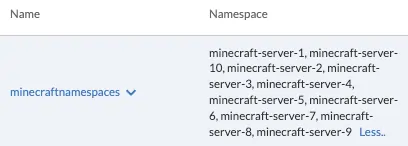
I run a backup, and it’s not very descriptive about the different backups of different namespaces, volumes, images, etc
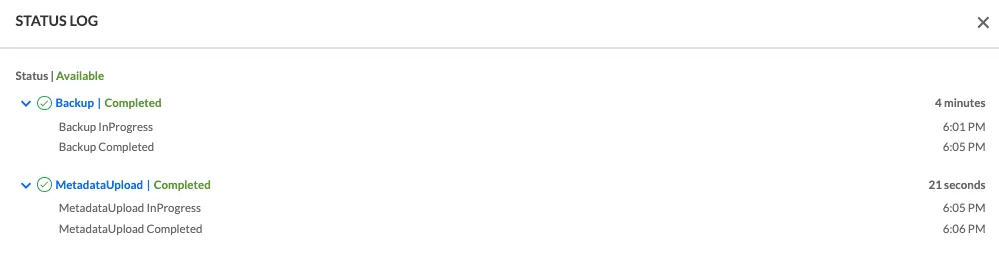
Cluster did the backup correctly for the 10 NS
Some metrics
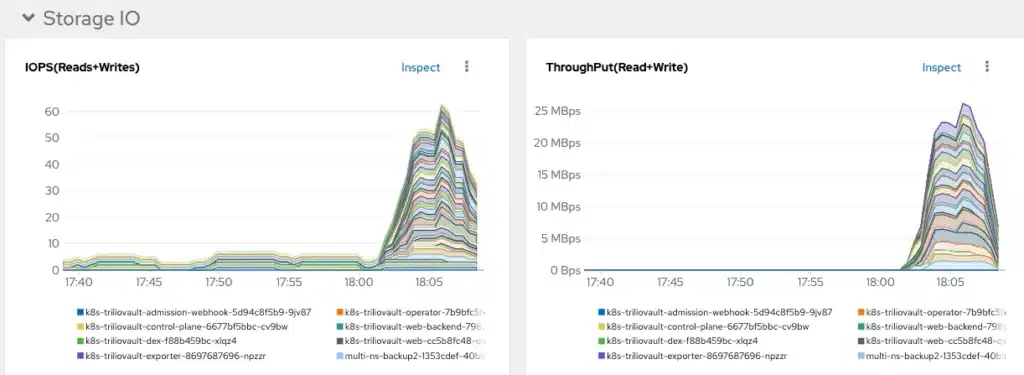
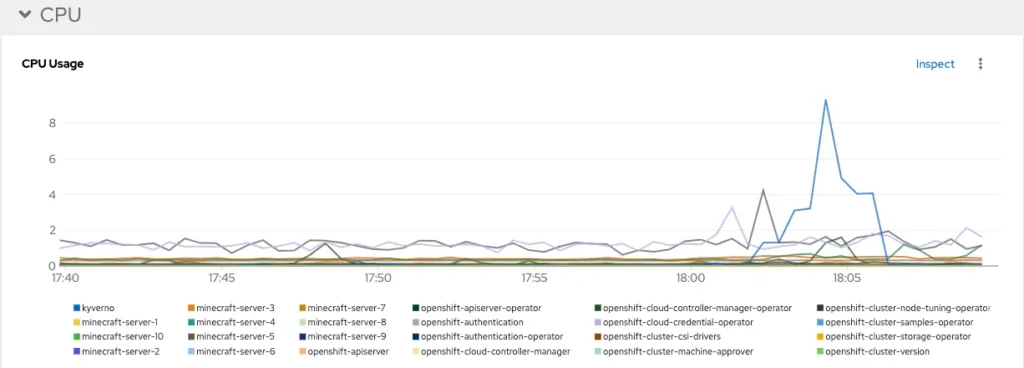


And when it comes to restore I can restore any or all

I applied this Resource Quota
					apiVersion: v1
kind: ResourceQuota
metadata:
  name: trilio-system-quota
  namespace: trilio-system
spec:
  hard:
    pods: "20"
    requests.cpu: "8"
    limits.cpu: "8"
    requests.memory: 8Gi
    limits.memory: 8Gi
Checking
					$ oc describe resourcequota trilio-system-quota -n trilio-system
Name:            trilio-system-quota
Namespace:       trilio-system
Resource         Used    Hard
--------         ----    ----
limits.cpu       200m    8
limits.memory    512Mi   8Gi
pods             11      20
requests.cpu     2200m   8
requests.memory  6296Mi  8Gi
And for that previous ResourceQuota to be enforced, you need to have a LimitRange, apply it
					apiVersion: v1
kind: LimitRange
metadata:
  name: trilio-default-limits
  namespace: trilio-system
spec:
  limits:
  - default:
      cpu: 100m
      memory: 1024Mi
    defaultRequest:
      cpu: 100m
      memory: 800Mi
    type: Container
And checking:
					$ oc describe limitrange trilio-default-limits -n trilio-system
Name:       trilio-default-limits
Namespace:  trilio-system
Type        Resource  Min  Max  Default Request  Default Limit  Max Limit/Request Ratio
----        --------  ---  ---  ---------------  -------------  -----------------------
Container   memory    -    -    800Mi            1Gi            -
Container   cpu       -    -    100m             1              -
The limiting factor here when I run the multi-ns backup, is the last line (requests.memory 7906Mi 8Gi)
					$ oc describe resourcequota trilio-system-quota -n trilio-system                                                                                                                                                                 Rodolfos-MacBook-Pro.local: Tue Mar 18 18:55:33 2025

Name:            trilio-system-quota
Namespace:       trilio-system
Resource         Used    Hard
--------         ----    ----
limits.cpu       3200m   8
limits.memory    3584Mi  8Gi
pods             14      20
requests.cpu     2410m   8
requests.memory  7906Mi  8Gi
The backup is going to take considerably longer than the previous one without restrictions.
First backup took 4 minutes +

This backup took 11 minutes +

Now I am going to increase the requests.memory to 16Gi ( requests.memory: 16Gi), and see where the bottleneck is.
					apiVersion: v1
kind: ResourceQuota
metadata:
  name: trilio-system-quota
  namespace: trilio-system
spec:
  hard:
    pods: "20"
    requests.cpu: "8"
    limits.cpu: "8"
    requests.memory: 16Gi
    limits.memory: 8Gi
Apply and check:
					$ oc apply -f resourcequota.yaml
resourcequota/trilio-system-quota configured
$ oc describe resourcequota trilio-system-quota -n trilio-system
Name:            trilio-system-quota
Namespace:       trilio-system
Resource         Used    Hard
--------         ----    ----
limits.cpu       200m    8
limits.memory    512Mi   8Gi
pods             11      20
requests.cpu     2200m   8
requests.memory  6296Mi  16Gi
Run the backup again, now it should be faster:
We get more pods
					!521
while true; do oc get pods -n trilio-system | grep Running | wc -l; sleep 3; done
      18
      18
      18
      18
      16
      13
      18
      18
Now apparently the enforcing happens at limits.memory or limits.cpu
					 oc describe resourcequota trilio-system-quota -n trilio-system                                                                                                                                                                 Rodolfos-MacBook-Pro.local: Tue Mar 18 19:11:02 2025

Name:            trilio-system-quota
Namespace:       trilio-system
Resource         Used     Hard
--------         ----     ----
limits.cpu       7200m    8
limits.memory    7680Mi   8Gi
pods             18       20
requests.cpu     2900m    8
requests.memory  11896Mi  16Gi
And the backup takes a bit more than 7 minutes. Not as long as the one with even more limited resources, but not as little as the unrestricted one

Metrics for the three backups

Script to delete all namespaces
					#!/bin/bash
NAMESPACE_PREFIX="minecraft-server-"
GRACE_PERIOD=120

# List namespaces to be deleted
namespaces=$(oc get projects -o name | grep "$NAMESPACE_PREFIX" | cut -d/ -f2)

if [ -z "$namespaces" ]; then
  echo "No namespaces found with prefix '$NAMESPACE_PREFIX'"
  exit 0
fi

echo "The following namespaces will be deleted:"
echo "$namespaces"
echo -n "Do you want to proceed with deletion? (y/N) "
read -r confirmation

if [[ ! $confirmation =~ ^[Yy]$ ]]; then
  echo "Deletion aborted"
  exit 1
fi

echo "Attempting to delete namespaces..."
oc delete project $namespaces --wait=true --timeout=${GRACE_PERIOD}s

# Check for remaining namespaces
remaining=$(oc get projects -o jsonpath='{.items[?(@.status.phase=="Terminating")].metadata.name}' | grep "$NAMESPACE_PREFIX")
if [ -z "$remaining" ]; then
  echo "All namespaces deleted successfully"
  exit 0
fi

echo "The following namespaces are still terminating:"
echo "$remaining"
echo -n "Do you want to force delete these namespaces? (y/N) "
read -r force_confirmation

if [[ ! $force_confirmation =~ ^[Yy]$ ]]; then
  echo "Force deletion aborted"
  exit 1
fi

for ns in $remaining; do
  echo "Force deleting $ns"
  oc get project $ns -o json | jq 'del(.spec.finalizers)' | oc replace --raw "/api/v1/namespaces/$ns/finalize" -f -
done

echo "Force deletion completed. Please verify the namespaces have been removed."
					$ ./delete10.sh
The following namespaces will be deleted:
minecraft-server-1
minecraft-server-10
minecraft-server-2
minecraft-server-3
minecraft-server-4
minecraft-server-5
minecraft-server-6
minecraft-server-7
minecraft-server-8
minecraft-server-9
Do you want to proceed with deletion? (y/N) y
Attempting to delete namespaces...
project.project.openshift.io "minecraft-server-1" deleted
project.project.openshift.io "minecraft-server-10" deleted
project.project.openshift.io "minecraft-server-2" deleted
project.project.openshift.io "minecraft-server-3" deleted
project.project.openshift.io "minecraft-server-4" deleted
project.project.openshift.io "minecraft-server-5" deleted
project.project.openshift.io "minecraft-server-6" deleted
project.project.openshift.io "minecraft-server-7" deleted
project.project.openshift.io "minecraft-server-8" deleted
project.project.openshift.io "minecraft-server-9" deleted
All namespaces deleted successfully