
OpenStack is one of the most popular open-source cloud platforms, able to provide a rich set of compute, storage, and networking services for various types of workloads, from traditional VMs to Kubernetes clusters and AI inference and training. All this capability is important, but deploying and managing a production-grade cloud requires a highly specialized skill set. The installation, configuration, and upgrades of over 20 OpenStack services present a challenge in terms of time and expertise.
You can address these challenges by using infrastructure automation tools specially built for the deployment and operation of OpenStack. In this article, we discuss the workflow of OpenStack-Ansible (OSA), an officially supported automation tool, offer recommendations, and walk through the deployment of a production-ready OpenStack cloud.
Summary of key OpenStack Ansible deployment recommendations
| Aspect | Recommendation |
|---|---|
| Platform prerequisite | Use supported operating systems like Debian 12 or Ubuntu 22.04 LTS. Ensure that SSH with public key authentication and Python 3.8/3.10 are installed on all hosts. |
| Processor selection | For control nodes, use modern multi-core processors with hyperthreading. Compute nodes require CPUs with hardware virtualization support (VT-x or AMD-V). |
| Storage sizing | Allocate at least 10 GB for the deployment host and 100 GB for control nodes. Storage nodes should have ample, expandable disk capacity for all virtual machines. |
| Network configuration | Use 10 Gbps+ interfaces while keeping storage traffic on a separate dedicated network. |
| IP planning | Plan and reserve private /22 IPv4 subnets for both management and storage to prevent highly disruptive IP changes later. |
| High availability setup | For prod instances, deploy services like MariaDB Galera across a minimum of three nodes to prevent service disruption. Also use HAProxy and Keepalived for load balancing and failover. |
| Deployment model | Choose a hyperconverged infrastructure (HCI) model for small to medium-sized deployments to optimize costs. For large, high-performance environments, use separate nodes for compute, storage, and control. |
What is OpenStack-Ansible?
OpenStack-Ansible (OSA) is an official OpenStack project that uses Ansible playbooks to automate the deployment, configuration, and management of OpenStack clouds. OSA uses LXC containers to deploy OpenStack services by default and can also do bare-metal deployment. Containers offer the benefits of isolating multiple services within the same host. Being lightweight, the containers have lower overhead and are easy to scale horizontally based on application requirements.
OSA takes YAML files (covered below) as input for the configuration of networks, hosts, and OpenStack services. The configuration options are highly flexible and provide the ability to tune the deployment to various production scenarios (deployment to a single site, multiple availability zones, and multiple sites). It requires knowledge of how OpenStack services work to take full advantage of service orchestration. In return, it considerably reduces the cloud engineers’ workloads to a few hours instead of days of configuration and tuning the OpenStack cloud.

Automated OpenStack & OpenShift Data Protection & Intelligent Recovery
Enjoy native OpenStack integration, documented RESTful API, and native OpenStack CLI
Restore Virtual Machines with Trilio’s One-Click Restore
Select components of your build to recover via the OpenStack dashboard or CLI
Comparison of OpenStack-Ansible and Kolla Ansible
The OpenStack cloud can be deployed via various methods. This includes deploying manually via source code or using distribution packages. There are various automated deployment tools in addition to OSA. Here we will compare OpenStack-Ansible with a related tool, Kolla Ansible, that also utilizes Ansible for service orchestration.
Feature | OpenStack-Ansible | Kolla Ansible |
Deployment model | System containers or bare metal | Application containers |
Configuration tool | Ansible | Ansible |
Container runtime | LXC or bare metal | Docker or Podman |
Complexity | High; requires good OpenStack knowledge | Low |
High availability | Built in | Built in |
Upgrades | Automated upgrades with downtime | Rolling upgrades with minimum downtime |
Customization | Highly flexible | Less flexibility |
If you want full control of the deployment with a high level of customization, are ready to go through a steep learning curve, and would like to perform bare-metal deployment or utilize system containers for isolation, go with OpenStack-Ansible. If you want a fast, lightweight deployment, have experience with containerized applications, and want to take advantage of rolling upgrades, choose Kolla Ansible.
High-level workflow for OpenStack-Ansible deployment
To illustrate how OSA works, we will proceed through a step-by-step tutorial as laid out in the following sections.
Preparing the deployment host
For a production environment, the deployment and subsequent upgrades of the cloud should be performed via a dedicated Ansible control node called the deployment host. This host is recommended to be connected to the same network as the control plane subnet of the cloud to reduce failures due to network reachability issues. It is necessary to retrieve the OpenStack-Ansible from the Git repository and perform the installation of the required deployment packages by running a bootstrap script.
Preparing the target hosts
We need to install Python and some networking tools on the nodes on which OpenStack will be deployed. For Ansible to connect with the target hosts, we will copy the root SSH key of the deployment host to the /root/.ssh/authorized_keys file of each node.
Configuring deployment
Next, we need to provide information on how to configure our OpenStack cloud. This includes network subnets we want to use for management, storage, and tenant networks. Which OpenStack service will be deployed on what nodes? We must specify the hostnames and IPs of the control, compute, storage, and network nodes.
OSA provides example configuration files for different scenarios, like all-in-one deployment, multinode production, and multiple availability zone deployment. You can copy one of these configurations that closely matches your requirements and make the necessary changes, such as providing your subnet information, node names, and IPs.
After making the required changes, we generate an inventory file using the script provided by OSA. The inventory script uses the management subnet information provided above to assign IPs to the containers, which will be created as per our deployment configuration.
The last configuration step is to generate the credentials that the different services will use for authentication.
Running playbooks
After the required configurations are done, we run the Ansible playbooks to perform the deployments. The first one, openstack.osa.setup_hosts, prepares the hosts for OpenStack services and infrastructure. It sets up the environment on the physical nodes by configuring networking, building the LXC containers on the hosts, and installing the required common components. The second playbook, openstack.osa.setup_infrastructure, installs and configures the foundational OpenStack services: Memcached, the repository server, Galera, and RabbitMQ. The third playbook, openstack.osa.setup_openstack, installs and configures the compute, network, storage, identity orchestration, telemetry, and dashboard services.
The execution of playbooks can take a few hours, depending on the resources of the hosts and internet speeds, as the required packages need to be downloaded during deployment.
Verifying deployment
When the deployment is complete without any errors reported by the playbooks, we can verify the OpenStack services by listing the service endpoints, user, and projects created. We need to configure provider networks, VM flavors, and upload images before we can start using the cloud.
Learn how Trilio’s partnership with Canonical helps better protect your data
Prerequisites and recommendations
Software requirements
OSA supports the following operating systems for cloud deployment:
- Debian 12
- Ubuntu 22.04 / 24.04 LTS
- CentOS Stream 9 / Rocky Linux 9
The deployment requires SSH services on all hosts with public key authentication enabled. Python version 3.8.x or 3.10.x needs to be installed on all hosts.
CPU recommendations
The infrastructure services of OpenStack are compute-intensive. It is recommended to have the recent generation of multicore processors with hyperthreading capability on the control nodes.
The compute nodes’ processors are recommended to have hardware-assisted virtualization-capable processors. For Intel, the CPU should have VT-x enabled, and for AMD, that’s AMD-V.
Storage recommendations
The deployment host requires a minimum of 10 GB of disk space for downloading all the packages. The control nodes must have a minimum of 100 GB of disk space because they host the database and image services.
Disks on the storage nodes should be large enough to host all the VMs and be capable of expansion as the need grows.
Network requirements
In a production environment, OpenStack services are spread across multiple nodes. A high-speed and reliable network is essential for the smooth functioning of the cloud. It is recommended that the nodes have 10 Gbps (or faster) interfaces.
The storage network interfaces should be separate from external access, as storage protocols are highly sensitive to network disruption, causing VMs to hang due to slight unavailability. An additional recommendation is to set up Ethernet interfaces in bond configuration to increase bandwidth and reliability.
IP address planning
You need to carefully plan the IP address allocation for the management and operation of the cloud. Running out of IPs and changing IPs are highly disruptive. For internal and management services, you can reserve a private /22 IPv4 subnet, which has 1,022 IPs for internal services. The storage should have a separate /22 private subnet. Depending on your requirement, you can have a public or private IP pool for external access and floating IPs.
Control plane high availability
For production deployments, different OpenStack services are configured in high availability and spread across different nodes. There are specific services, like MariaDB Galera cluster, that require a minimum of three nodes to maintain a quorum and avoid split-brain scenarios. The control plane services like RabbitMQ, Keystone, Nova, Neutron, and Glance APIs are deployed on multiple nodes. The load balancing and failover are typically managed via a combination of HAProxy and Keepalived.
HCI vs. separation of nodes
One key decision while deploying infrastructure is whether to have separate nodes for different OpenStack services or collocate multiple services on nodes, which is called hyperconverged infrastructure (HCI).
With HCI, you get the most cost-efficient utilization of resources; you can scale up compute and storage simultaneously as your requirements grow. The downside is the potential performance impact due to contention for resources between different services.
Alternatively, you can have separate physical nodes for compute, storage, network, and control. This provides the flexibility of independently scaling services without a single point of failure, and you get the best performance from the nodes. The downside is the higher upfront cost.
For small to mid-sized deployments, you can work with HCI. For large production environments with high performance requirements, you should go with the separation of nodes.
Learn about the features that power Trilio’s intelligent backup and restore
Deployment configuration and customization
Now let’s do the deployment of our OpenStack cloud. In this example, we will do a three-node deployment hosting the control, storage, compute, and network services.
Prepare the cloud nodes
Install the prerequisite packages on the cloud nodes.
# apt install bridge-utils debootstrap tcpdump vlan python3
The following is the network allocation and topology we will use for the deployment. We need to configure network bridges for the virtual networking of containers on the hosts. We can have separate physical interfaces for the different networks, or we can configure VLANs logically separating the subnets if we do not have enough physical ports.
Network | CIDR | Interface | VLAN |
Management Network | 172.16.185.0/24 | br-mgmt | native-vlan |
Storage Network | 172.16.100.0/24 | br-storage | 100 |
Overlay Network | 172.16.101.0/24 | br-vxlan | 101 |
Provider Network | 172.16.37.0/24 | br-provider1 | 426 |
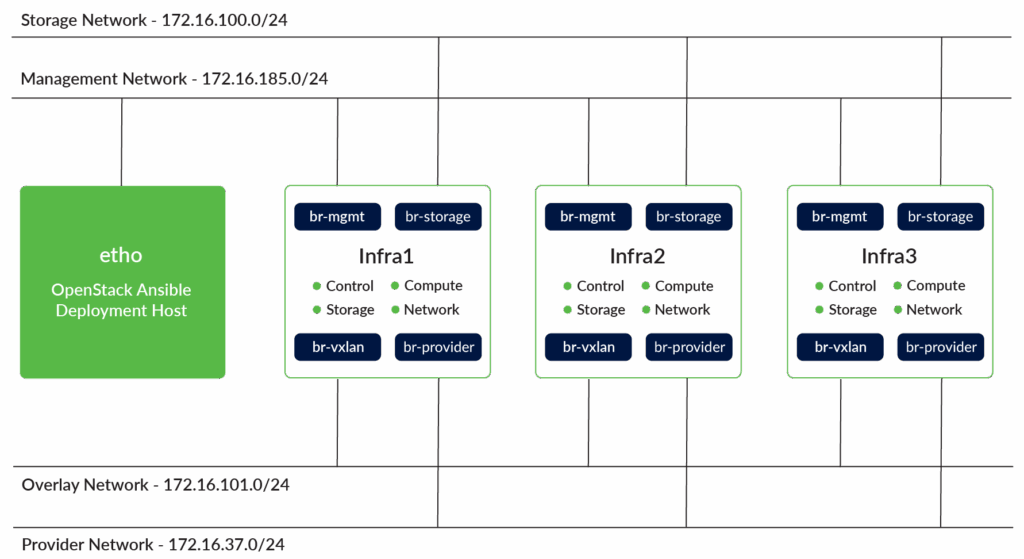
OpenStack nodes with services and network topology
On each of the cloud nodes, we will configure an LVM group called cinder-volume on an empty physical partition. These will be used by the cinder block storage service.
					# pvcreate --metadatasize 2048 /dev/sda1
# vgcreate cinder-volumes /dev/sda1
Prepare the deployment host
We will use a dedicated machine as the deployment host for the cloud. This will be the Ansible control node from where all the playbooks will be run. All the installations will be done via the root user to avoid any permission-related issues.
Generate the root SSH key on the deployment host and copy the key to /root/.ssh/authorized_keys files on the cloud nodes.
Install the prerequisite packages of OpenStack-Ansible on the deployment host.
# apt install build-essential git chrony python3-dev
We will use the latest stable version of the repository for the production environment. Development releases are not recommended for production environments.
					# git clone -b stable/2025.1 \
https://opendev.org/openstack/openstack-ansible \
/opt/openstack-ansible
Run the bootstrap script, which will install and configure Ansible on the host, install and configure the Python environment, and install the required dependencies.
					# /opt/openstack-ansible/scripts/bootstrap-ansible.sh
# Bootstrap Output
System is bootstrapped and ready for use.
Copy the /opt/openstack-ansible/etc/openstack_deploy into /etc/openstack_deploy.
					# cd /opt/openstack-ansible
# sudo cp -r etc/openstack_deploy/ /etc/
We need to configure the openstack_user_config.yml file under the directory /etc/openstack_deploy. This directory contains many example configuration files that can be used as a starting template for the required configuration. These files are heavily commented to help you configure the required options.
We need to define the subnets to be used, the load balancers’ IPs, the nodes inventory (which will be used for infrastructure, compute, and storage services), and the storage configuration for the storage nodes. The openstack_user_config.yml configuration referenced here will be used for our deployment.
We can tune the configuration of different services like Glance, Ceph, HAproxy using the file user_variables.yml under the directory /etc/openstack_deploy. There are multiple example files with comments there to get you started.
We will configure the HAproxy and Keepalived IPs and interface to be used for the service. Optionally, if your nodes have private IPs, we can configure proxy settings so that the required source packages can be downloaded. The complete user_variables.yml can be referenced here.
					proxy_env_url: http://proxy.domain.com:3128/

haproxy_keepalived_external_vip_cidr: "{{external_lb_vip_address}}/32"
haproxy_keepalived_internal_vip_cidr: "{{internal_lb_vip_address}}/32"
haproxy_keepalived_external_interface: br-mgmt
haproxy_keepalived_internal_interface: br-mgmt
Next, we generate the inventory of our deployment, which is based on the configurations above. This will generate the LXC container names and assign them IPs from the management network, and group the nodes according to their specific role.
					# /opt/openstack-ansible/inventory/dynamic_inventory.py \
--config /etc/openstack_deploy/
Finally, we need to generate the credentials that will be used by each of the services of OpenStack.
					# /opt/openstack-ansible/scripts/pw-token-gen.py \
--file /etc/openstack_deploy/user_secrets.yml

Operation Complete, [ /etc/openstack_deploy/user_secrets.yml ] is ready
Running playbooks
After making all the required configurations as above, we will run the deployment playbooks. After the execution of each playbook, we should get a successful execution notice with no failed or unreachable tasks.
First, run the Ansible foundation playbooks for preparing hosts.
					# openstack-ansible openstack.osa.setup_hosts
.
.
.
EXIT NOTICE [Playbook execution success] **************************************
Next, run the Ansible infrastructure playbooks for OpenStack infrastructure services.
					# openstack-ansible openstack-ansible openstack.osa.setup_infrastructure
.
.
.
EXIT NOTICE [Playbook execution success] **************************************
Now run the Ansible OpenStack services playbooks.
					# openstack-ansible openstack.osa.setup_openstack
.
.
.
EXIT NOTICE [Playbook execution success] **************************************
Verify OpenStack operations
After the successful execution of the OSA playbooks, we have a functional OpenStack cloud. We can start interacting with OpenStack via the utility container deployed on the infrastructure hosts.
Log in to the first infrastructure node and list the LXC containers running on the host.
					root@infra1:~# lxc-ls
infra1-cinder-api-container-cb5         infra1-galera-container-6f9
infra1-glance-container-7d7             infra1-heat-api-container-41c
infra1-horizon-container-bae            infra1-keystone-container-fbc
infra1-memcached-container        infra1-neutron-ovn-northd-container
infra1-neutron-server-container-7d4     infra1-nova-api-container-74d
infra1-placement-container-67a          infra1-rabbit-mq-container-55
infra1-repo-container-fb3156               infra1-utility-container-d51f82
ubuntu-24-amd64
Attach the terminal via the command line with the utility container.
					root@infra1:~# lxc-attach infra1-utility-container-d51f824b
root@infra1-utility-container-d51f824b:~#
Verify API connectivity and command line operations
In the /root folder of the utility container, an OpenStack rc file is generated during deployment. We can source the openrc file to authenticate via Keystone and start verifying OpenStack operations. We can list the OpenStack services and the users created during deployment.
					root@infra1-utility-container-d51f824b:~# source openrc


root@infra1-utility-container-d51f824b:~# openstack service list
+----------------------------------+-----------+----------------+
| ID                               | Name      | Type           |
+----------------------------------+-----------+----------------+
| 038acdbf71d840e6988733ae187d0fbe | placement | placement      |
| 0c7dd86922654bf5bce7b8a264cc4e81 | heat      | orchestration  |
| 3f760e90676f41b1be9af0b338b2c1ca | cinder    | block-storage  |
| 56fa5c1264a148efa3a40cfc04535fb9 | heat-cfn  | cloudformation |
| 8474cdf6839640d59f985065c217cd51 | glance    | image          |
| bac908fe056a4cbcbff4a4c3b20a175e | nova      | compute        |
| e5c86d00176940048f3ea9d72d908d04 | neutron   | network        |
| fcf1061366b345949b32e55a3a227c23 | keystone  | identity       |
+----------------------------------+-----------+----------------+


root@infra1-utility-container-d51f824b:~# openstack user list
+----------------------------------+--------------------+
| ID                               | Name               |
+----------------------------------+--------------------+
| 0a2317626ddf4d80b9b2625041f4a622 | admin              |
| 23a94324ae104014871fb6e0be9cff5f | nova               |
| 281c1a15fb18489096851212fb1f90d5 | cinder             |
| 3dfc5329604d48edbe50feb72333f308 | placement          |
| 51e0214bdea2473caf568f092b4d4d21 | glance             |
| 66a7b08c2f214bdfaa097b86145ed680 | heat               |
| e0a119f0677b4da8b64b84679dd73739 | stack_domain_admin |
| ff16ca59e91e45468967c6848c53b9be | neutron            |
+----------------------------------+--------------------+
Verify dashboard operations
We can access the Horizon dashboard using the IP and credentials configured in the steps above. The dashboard is accessible over the external_lb_vip_address: 172.16.185.10 configured in the openstack_user_config.yml file. The default admin credentials are generated and placed in the /etc/openstack_deploy/user_secrets.yml file. We can get the credentials from this file.
					# grep keystone_auth_admin /etc/openstack_deploy/user_secrets.yml
keystone_auth_admin_password: 97472535598b77557abb42f2a92cd56b01ddb9
We can now access the Horizon URL https://172.16.185.10 using the admin login and the password above.
Backups and disaster recovery
When running a live environment with production data, it is imperative to have proper backups and a disaster recovery mechanism. These backups must be placed off-site, away from the cloud deployment. For the OSA deployment, you should keep a backup of the /etc/openstack_deploy directory. The directory contains all the configured options, network structure, host inventory, and password. You can perform redeployment using the backup if required.
Second, you should make backups of the MariaDB Galera Database at regular intervals, which can be restored in case of any corruption of the database.
For the running VMs/instances, you can create volume backups or take snapshots of instances. The limitation with these backups or snapshots is that they capture only the disk state and not the metadata associated with the instances. There is no automation for backups, and recovery requires manual intervention for restoring network connectivity, security groups, etc.
If you want to automate your backups and configure retention policies, have a complete workload backup that includes volumes, network configuration, and metadata, you can go with Trilio for OpenStack. Trilio seamlessly integrates with OpenStack, simplifying the backup process and providing one-click restores.
Find out how Vericast solved K8s backup and recovery with Trilio
Last thoughts
OpenStack is a high-maintenance infrastructure. If your workflow includes Ansible orchestration, you have operational experience and are comfortable with LXC containers, and you have knowledge of how the OpenStack services work, you can leverage the power of OpenStack-Ansible to automate your cloud deployment.
Consider starting with an all-in-one deployment for a quick evaluation, then scale to a multi-node deployment, and eventually expand to a full multi-region OpenStack environment, all managed through OpenStack-Ansible. You can enhance OpenStack’s backup options with Trilio to protect against production data loss, enabling rapid disaster recovery with minimal downtime and across multiple regions of your OpenStack cloud.

Like This Article?
Subscribe to our LinkedIn Newsletter to receive more educational content